
Img Tool
Screenshots
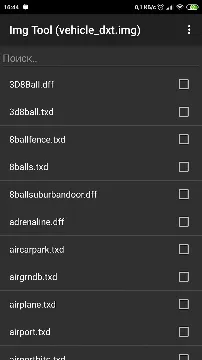
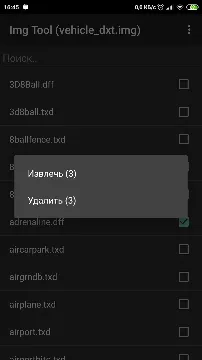
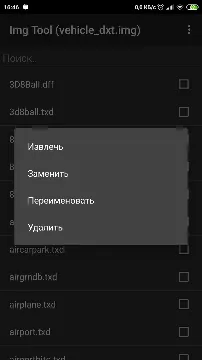
Img Tool App For Android provides a technical solution for mobile gamers who want to customize their experience in open-world sandbox games. Many enthusiasts find that standard gameplay eventually becomes repetitive after completing the main story missions. This application allows users to access and modify the internal archive files that store 3D models and textures. By opening these specific archives, you can inject new content directly into the game environment.
The software functions primarily as an archive editor for files ending in the IMG format. It allows you to browse thousands of individual items hidden within the large game data files. You can extract existing models to study them or replace them with custom creations made by the global modding community. This process transforms your mobile gaming session into a creative project where you control the visual elements of the world. It operates with a focus on precision and direct file management.
Modify Game Vehicles and Weapons
Img Tool allows you to swap standard cars and bikes for highly detailed custom models. Many players prefer to see real-world vehicle brands cruising through the digital streets of their favorite games. You can download a replacement file and use this tool to overwrite the original data. This process updates the game instantly without requiring a full reinstallation of the software. It gives you the power to curate your own collection of sports cars or military hardware.
The replacement process is straightforward once you identify the correct file names. You simply search for the specific vehicle you want to change within the archive. After finding the match, you use the “replace” command to point the tool toward your new custom file. This ensures that every time that vehicle spawns in the game, it appears as your chosen model. It adds a fresh layer of excitement to every high-speed chase or mission.
Update Character Textures and Appearances
Personalizing the protagonist is another popular way to use this application. You can change the clothing textures, skin tones, or even the entire character model of the main hero. This allows you to play as different famous characters or unique avatars designed by other users. The tool reaches into the character data folders to swap out the visual “skins” that wrap around the 3D models. It makes the narrative feel more personal and engaging.
Beyond the main character, you can also modify the appearance of non-player characters throughout the city. This helps in creating a more diverse or thematic world based on your preferences. You might want to update the uniforms of police officers or change the outfits of pedestrians to match a specific era. The application provides the access necessary to make these large-scale visual changes possible. Your digital city can look exactly how you imagine it.
Efficient Archive Management Features
The application includes several tools to help you manage large data archives efficiently. You can use the search function to locate specific files among thousands of entries in seconds. This saves you from scrolling through endless lists of technical names. Once you find the files you need, you can extract them to your phone’s storage for backup purposes. Keeping a backup is a smart way to ensure you can revert any changes if a mod causes a conflict.
- Search for specific DFF and TXD files quickly.
- Extract original assets to create backup copies.
- Delete unwanted or corrupted files from the archive.
- Rebuild the archive to optimize performance and fix errors.
Rebuilding the archive is a crucial feature that keeps your game running smoothly. After adding or removing many files, the internal structure of the archive can become fragmented. The “Rebuild” command organizes the data and reduces the overall file size. This prevents the game from crashing and ensures that textures load correctly during gameplay.
Installing Maps and Environment Mods
Img Tool is not limited to just vehicles and people; it can also modify the world itself. You can use it to install new map layouts, buildings, or environmental textures. Some users enjoy adding new islands or detailed interior locations to the game map. By replacing the environmental data files, you can turn a familiar city into a brand-new landscape. This significantly extends the life of the game and provides new areas to explore.
High-resolution texture mods can also be applied to roads, trees, and skyboxes. These changes improve the overall visual quality of the game to match modern mobile standards. You can make the asphalt look more realistic or give the grass a more vibrant color. The tool acts as the bridge between these high-quality assets and the game’s engine. It allows older games to look stunning on the latest high-definition smartphone screens.
Technical Precision and File Control
The application provides a “long press” menu that offers various commands for expert users. You can rename files within the archive to fix naming conflicts between different mods. This level of control is essential for complex modding projects that involve multiple changes. You can also see the exact size and properties of every file before you decide to modify it. This transparency helps you manage your phone’s storage space effectively.
Adding new files is just as easy as replacing old ones. If a mod requires extra data that was not in the original game, you can use the “Add” feature. This expands the possibilities of what the game can handle. The tool ensures that the new files are correctly integrated into the IMG structure so the game recognizes them. It provides a professional-grade editing environment for mobile users who want to go beyond the basics.
Support for Various Modding Formats
The software primarily handles DFF files, which contain the 3D geometry of objects. It also works in tandem with other texture tools to ensure that the “skins” look correct on the models. Most mobile mods are packaged in these formats, making the tool compatible with a vast library of online content. You can find community-made assets for almost anything you can imagine. The app ensures that these files are placed exactly where they need to be.
- Compatible with standard DFF model files.
- Supports large-scale IMG archives found in mobile ports.
- Works with both original and modified game versions.
- Allows for batch extraction of multiple files at once.
This wide compatibility makes it a staple in the mobile modding community. Whether you are a beginner or an experienced developer, the tool provides a reliable platform. It stays updated to handle the file structures of various mobile game releases. You can trust that your modding efforts will result in a stable and visually impressive game.
Final Thoughts
Img Tool App For Android is a specialized utility that unlocks the creative potential of mobile gaming. It provides direct access to game archives, allowing users to replace vehicles, characters, and entire environments. With features like archive rebuilding and precise file searching, it ensures that your modifications remain stable and high-performing. The interface is simple enough for new modders while offering the depth required by experts. By using this tool, you can transform an old favorite into a completely new experience tailored to your tastes. It is a must-have for anyone who wants to take control of their digital world.







